

AI that shortens time-to-fill, not just data entry.
- Ranked, explained shortlists the moment an order lands
- Fill probability and the constraint holding each order back
- Fall-off and credentialing risk flagged before they cost a placement
- Thot Bot answers questions from your own records, and asks before it acts
- A prioritized next-best-action queue for every desk

Where AI creates speed
Intelligence at every point that costs you days
Each surface exists because a locums desk loses time there: deciding who to present, noticing a stall, preparing the next step, or answering a question that needed three reports.
Ranked shortlists in seconds
Every new coverage request is scored against your entire book on licensure, specialty, availability, rate fit and prior site history — a ranked shortlist before a recruiter opens the order.
Reverse matching for idle providers
Works the other direction too: for any available provider, Thotara surfaces the open roles they can actually be credentialed into inside the client's window.
Fill probability per order
Each order carries a live likelihood of filling on time, with the specific constraint holding it back — licensure lead time, rate ceiling, thin candidate pool or a stalled name clear.
Bottleneck detection
Thotara watches where placements stall and flags the exact step losing days: presentation waiting on a client, a document not requested, a privileging packet sitting unassembled.
Fall-off risk signals
Patterns from your own placement history predict which confirmed assignments are likely to fall off, early enough to keep a backup provider warm.
Next best action per desk
Each recruiter and coordinator opens a prioritized queue — the calls, presentations and follow-ups most likely to convert today, not an undifferentiated task list.
Workflow that moves itself forward
Stage changes trigger the credentialing items, letters, travel requests and client updates the next step needs, so nobody is the bottleneck by forgetting.
Pipeline and margin insight
Ask why fills slowed, which clients erode margin, which specialties are under-sourced, and where a recruiter's conversion drops — answered from your own data, not a static report.


Ask anything, act on approval
Thot Bot answers questions across your records and can execute the follow-up — draft the presentation, create the tasks, message the provider — after you approve it.
Client demand intelligence
Recurring coverage patterns get spotted before the facility calls, so you're sourcing against next quarter's gaps instead of reacting to this week's email.
Zero-effort data capture
CVs, credentials, itineraries and inbound email become structured records in the background. Necessary plumbing — not the point.
Reads only what you can read
Every AI query runs through the signed-in user's own permissions, so intelligence never crosses an organization or a role boundary.
Shipped, in the product today
AI assistance on every screen you already use
These aren't roadmap items. Each one sits inside the workflow it belongs to, drafts or reads from your real records, shows what it based its answer on, and waits for a person to accept before anything is saved or sent.
Suggested replies
Every text and email thread offers two or three drafted replies grounded in the conversation and your own templates. Insert, edit, send — or save a good one as a template for the team.
Conversations logged for you
A call, text or email thread becomes a summary with sentiment, the facts stated and suggested follow-up tasks. Approve it and the activity and tasks land on the record.
Credential document reader
Drop in a licence, certification or verification and Thotara reads the fields out with confidence levels and the exact text each came from. A credentialing user accepts before anything is written.
Coverage request to draft order
An inbound email asking for coverage becomes a draft job order — client, location, specialty, dates, shift pattern — with open questions listed and nothing published until a recruiter finishes it.
Timesheet reader and exception triage
Submitted timesheets are read, then checked against the shift and the assignment: missing clock-outs, hours and rate mismatches, duplicate or out-of-range dates. Critical exceptions must be acknowledged before entries apply.
Submittal packet writer
A candidate's profile, credentials, work history and match reasoning become a client-ready presentation email you edit before it goes out, opened in your normal composer.
Invoice pre-audit
Before an invoice leaves, lines are compared to approved hours, contracted rates, billing windows and prior invoices. The checks are calculated; AI only ranks and explains what to look at first.
Receipt and itinerary capture
Flight, hotel and car confirmations are read into the travel record — vendor, dates, confirmation numbers, amounts — attached to the right reservation once you confirm.
Suggested tasks
Expiring credentials, assignments without travel, stale orders, unsigned agreements and overdue timesheets are turned into proposed tasks on your dashboard. Pick the ones you want.
Broadcast and outreach copy
Drafts SMS and email campaign copy inside your compliance rules and merge fields, and personalises first-touch outreach to sourced candidates. Opt-outs are respected; sending stays manual.
Credentialing gap chaser
Compares what a role requires against what a provider has, then drafts the specific ask for the missing items — no generic 'please send documents' message.
Work-history verification assist
Flags employment gaps, overlaps, missing detail and licence conflicts across a provider's history, and drafts the employer verification emails for each one.
Provider intake pre-fill
Providers can pre-fill their application from the documents they've already uploaded, then review and correct every proposed answer before it saves.
Voice notes
Speak an update after a call and get a structured note with the facts and follow-up tasks pulled out, ready to save against the record.
Ask questions about your data
Type a question in plain English — which placements end next month, which clients billed most last quarter — and get a table back, read strictly through your own permissions.
Duplicate detection and merge
Finds likely duplicate providers and clients, explains why they match, and merges them field by field on your confirmation. History is repointed and the losing record is archived, never deleted.
Data quality sweeps
Scans for missing, malformed and inconsistent values across your core records and proposes the fix for each. You approve the ones you want applied.
Inline field assist
Next to any long text field — job descriptions, provider summaries, notes — write a first draft or tighten what's there, then replace, insert or discard.
Meet Thot Bot
Ask your own records a question, get an answer with the receipts
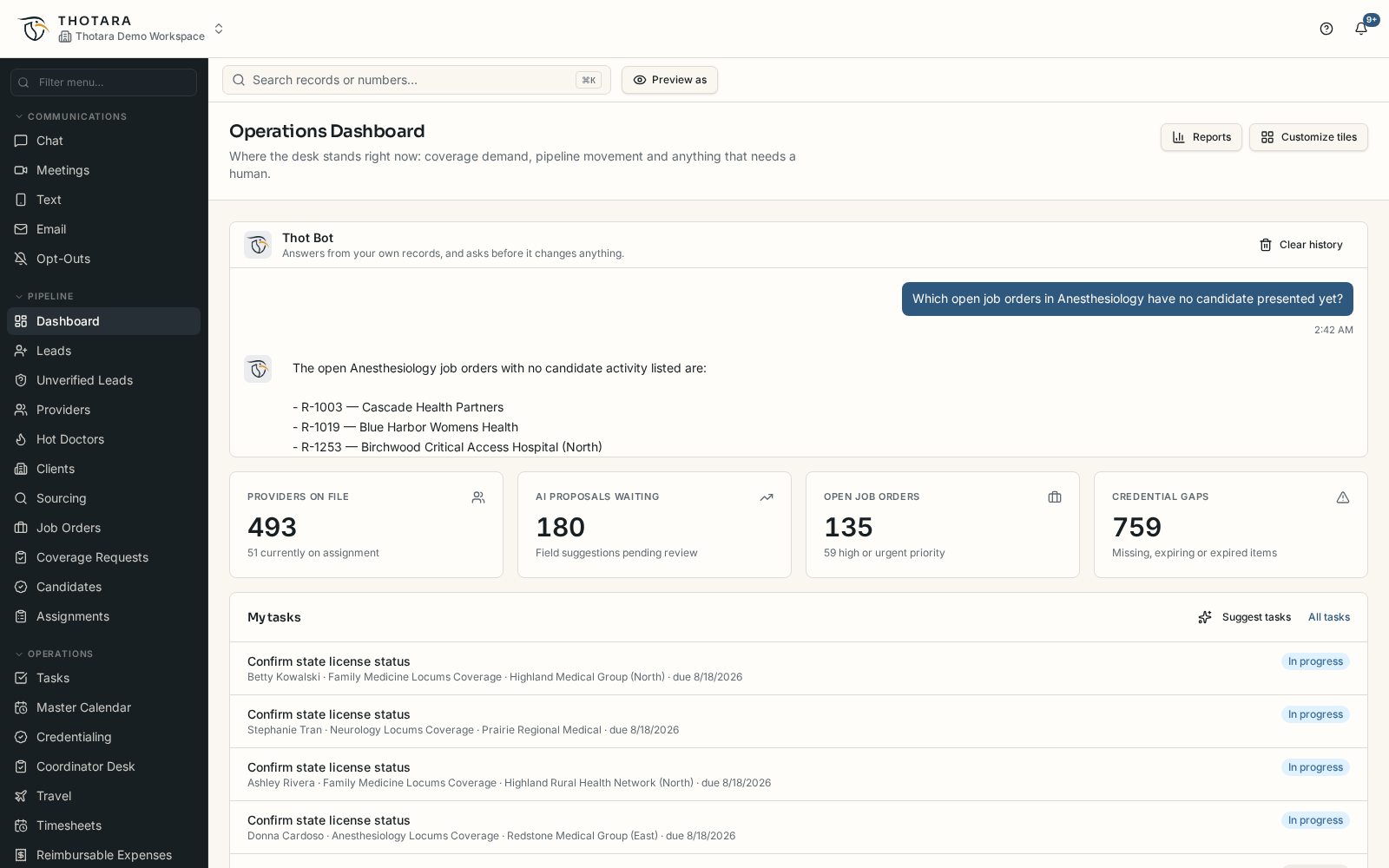
Thot Bot is Thotara's assistant. It sits on the dashboard, in reporting and inside Help, and answers from the records the person asking is already allowed to see: which orders are open with nobody presented, which credentials expire this month, which weeks are waiting on approval. Ask it in plain language and it can also do the work — draft the presentation email, start the report, open the follow-up task — but it always shows what it used and asks before anything is saved or sent.
Nothing saves itself
Every proposal waits for a person
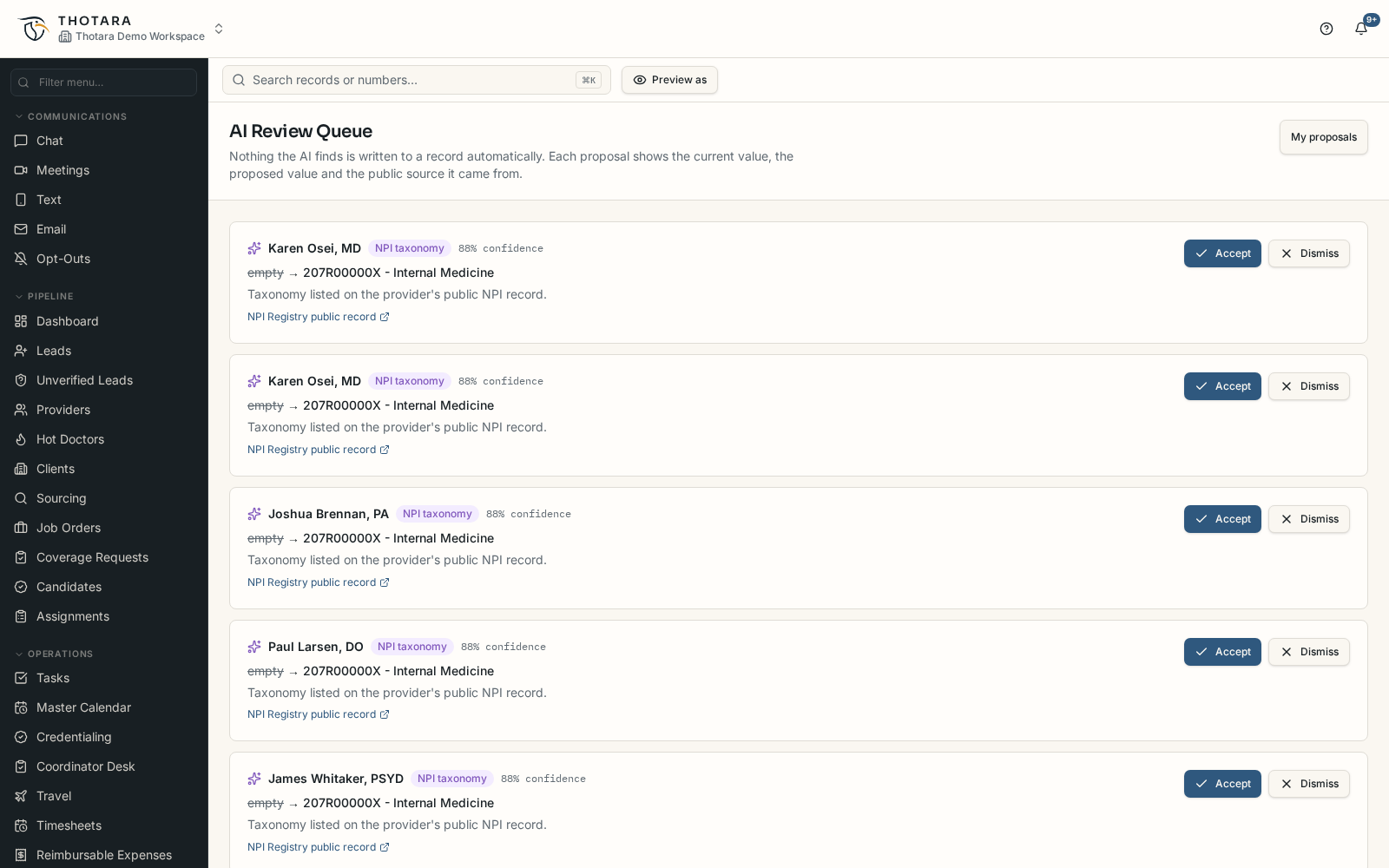
When Thot Bot or any other part of the AI finds something worth writing to a record, it lands in the review queue instead of the record: current value, proposed value, confidence and the source it came from. Accept it, dismiss it, or ignore it — rates, pay, contract terms and credential status always stay in human hands.
- Answers scoped to what the person asking may already see
- Every answer and proposal carries its source
- Drafted emails, tasks and reports need a click to become real
Speed model
Where the days come from
Time-to-fill is rarely lost in one place. It leaks in small stalls between search, presentation, name clear and credentialing — which is exactly what Thotara watches.
- Seconds
- From new order to a ranked, explained shortlist
- Every stage
- Monitored for the bottleneck actually costing days
- One queue
- Highest-conversion next actions per recruiter
How it works
Read, rank, clear, confirm
- 01
It reads your pipeline continuously
Orders, providers, credentialing items, client responses and historical outcomes — the model works from the live state of your desk, not a nightly snapshot.
- 02
It ranks and explains
Shortlists, risk scores and priorities always show their reasoning: which factors drove the rank and which constraint is costing you days.
- 03
It clears the path
The work the next stage requires gets prepared — checklist items, letters, travel, client updates — so momentum doesn't depend on memory.
- 04
A human decides anything consequential
Presentations, credential dates, record changes and outbound actions wait for an explicit accept, with the source evidence attached.
Judgement stays with your recruiters
Speed is worthless if it produces a wrong license state or a provider your client won't clear. Thotara's AI compresses the search, the monitoring and the preparation — and leaves the decision, the relationship and the compliance sign-off with the people accountable for them.
- Every rank and risk score shows its reasoning
- Credential dates always require a credentialing user's accept
- Assistant actions show the exact payload before running
- Accepts and rejects are recorded in the audit trail
- AI reads through your permissions, never around them
Questions
What buyers ask about the AI
How does AI actually make placements faster?
It removes the three things that consume the clock: finding who qualifies, noticing where a placement stalled, and preparing the next step. Shortlists arrive instantly, stalls surface the same day they happen, and credentialing, letters and travel are queued the moment a stage changes.
What does it use to rank providers?
Licensure and privileging feasibility inside the client's window, specialty and procedure fit, availability against the shift pattern, rate expectations versus the order's rate card, travel preferences and prior performance at that facility.
Does the AI ever change data on its own?
No. Suggestions carry their source and require a human accept, and any action the assistant proposes shows the exact payload before it runs.
Does the AI ever send a message or an invoice by itself?
No. Every drafted reply, outreach message, broadcast, submittal packet and verification email opens in your normal composer for you to edit and send. Invoice pre-audit and timesheet triage only flag and explain — nothing is billed, approved or transmitted without a person doing it.
Will AI quote a rate or clear a credential?
Never. AI won't state rates, pay, contract terms or credential clearance on its own. Rate and contract language stays with your recruiters, and clearance stays with credentialing.
Do we need clean historical data first?
No. Insight quality improves with history, but ranking, fill-probability and bottleneck detection work from the pipeline you build in Thotara from day one.
What stops the assistant from leaking data across organizations?
It queries through the signed-in user's own database session, so row-level rules apply to the AI exactly as they apply to the person asking.